Systeme Unix - S5
Annee : 2022-2023 (Semestre 5)
Credits : 3 ECTS
Type : Systemes d'Exploitation
PART A : PRESENTATION GENERALE
Objectifs du cours
Ce cours introduit les systemes d'exploitation Unix/Linux en se concentrant sur l'utilisation pratique de la ligne de commande, la programmation shell, et l'administration systeme de base. L'accent est mis sur la maitrise des outils essentiels pour le developpement et l'exploitation de systemes embarques.
Competences visees
- Maitriser la ligne de commande Unix/Linux
- Programmer des scripts shell pour l'automatisation
- Gerer les fichiers, processus et permissions
- Utiliser les outils de traitement de texte (grep, sed, awk)
- Comprendre l'architecture du systeme de fichiers
- Effectuer des taches d'administration systeme basiques
- Combiner les commandes avec pipes et redirections
- Resoudre des problemes pratiques avec les outils Unix
Organisation
- Volume horaire : Cours, TD et videos pedagogiques
- Evaluation : Examen ecrit + exercices pratiques
- Semestre : 5 (2022-2023)
- Prerequis : Notions d'informatique de base
PART B : EXPERIENCE, CONTEXTE ET FONCTION
Contenu pedagogique
Le cours couvre les fondamentaux d'Unix a travers une approche pratique.
1. Fondamentaux Unix
Philosophie Unix :
Principes de conception :
- Tout est fichier (peripheriques, sockets, processus)
- Programmes simples faisant une seule chose bien
- Combinaison d'outils avec pipes
- Interfaces textuelles pour faciliter l'automatisation
- Systeme multi-utilisateurs et multi-taches
Architecture systeme :
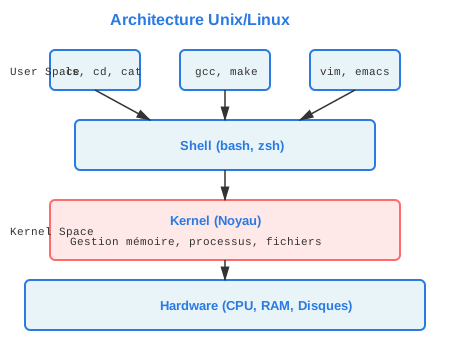
Figure : Architecture en couches d'un systeme Unix/Linux
| Composant | Fonction |
|---|---|
| Noyau (kernel) | Gestion materielle, processus, memoire |
| Shell | Interpreteur de commandes |
| Programmes systeme | Utilitaires de base |
| Applications | Logiciels utilisateur |
Shells disponibles :
- bash (Bourne Again Shell) : le plus repandu
- sh (Bourne Shell) : shell historique
- zsh (Z Shell) : shell avance avec auto-completion
- csh/tcsh (C Shell) : syntaxe proche du C
2. Systeme de fichiers
Arborescence standard :
Structure hierarchique partant de la racine (/).
| Repertoire | Contenu |
|---|---|
| /bin | Commandes essentielles (ls, cp, mv) |
| /etc | Fichiers de configuration |
| /home | Repertoires personnels des utilisateurs |
| /usr | Applications et utilitaires |
| /var | Donnees variables (logs, caches) |
| /tmp | Fichiers temporaires |
| /dev | Fichiers de peripheriques |
| /proc | Informations du systeme et processus |
Types de fichiers :
- Fichier regulier (-) : fichier normal
- Repertoire (d) : dossier
- Lien symbolique (l) : raccourci vers un autre fichier
- Peripherique bloc (b) : disque dur, USB
- Peripherique caractere (c) : terminal, imprimante
- Socket (s) : communication inter-processus
- Pipe nomme (p) : canal de communication
Commandes de navigation :
pwd                    # Afficher repertoire courant
cd /chemin/vers/dir    # Changer de repertoire
cd ..                  # Remonter d'un niveau
cd ~                   # Aller au home
cd -                   # Revenir au repertoire precedent
ls                     # Lister fichiers
ls -l                  # Liste detaillee
ls -a                  # Afficher fichiers caches
ls -lh                 # Tailles lisibles (KB, MB)
Manipulation de fichiers :
# Creation
touch fichier.txt      # Creer fichier vide
mkdir dossier          # Creer repertoire
mkdir -p a/b/c         # Creer arborescence

# Copie et deplacement
cp source dest         # Copier fichier
cp -r dir1 dir2        # Copier repertoire recursivement
mv ancien nouveau      # Renommer/deplacer

# Suppression
rm fichier             # Supprimer fichier
rm -r dossier          # Supprimer repertoire recursivement
rm -f fichier          # Forcer suppression
rmdir dossier          # Supprimer repertoire vide
Visualisation de fichiers :
cat fichier            # Afficher contenu complet
more fichier           # Afficher page par page
less fichier           # Naviguer dans le fichier
head fichier           # Afficher premieres lignes
head -n 20 fichier     # Afficher 20 premieres lignes
tail fichier           # Afficher dernieres lignes
tail -f fichier        # Suivre ajouts en temps reel (logs)
3. Permissions et droits d'acces
Systeme de permissions :
Format : drwxrwxrwx
- Premier caractere : type de fichier
- 3 caracteres suivants : droits du proprietaire (user)
- 3 suivants : droits du groupe (group)
- 3 derniers : droits des autres (others)
Types de permissions :
| Permission | Fichier | Repertoire |
|---|---|---|
| r (read) | Lire le contenu | Lister le contenu |
| w (write) | Modifier le fichier | Creer/supprimer fichiers |
| x (execute) | Executer le fichier | Acceder au repertoire |
Representation numerique :
Chaque permission a une valeur :
- r = 4
- w = 2
- x = 1
Exemples :
- 755 = rwxr-xr-x (proprietaire : tout, autres : lecture+execution)
- 644 = rw-r--r-- (proprietaire : lecture+ecriture, autres : lecture seule)
- 700 = rwx------ (proprietaire seul a tous les droits)
- 777 = rwxrwxrwx (tous les droits pour tout le monde)
Commandes de gestion :
# Modifier permissions
chmod 755 fichier              # Mode numerique
chmod u+x fichier              # Ajouter execution pour user
chmod g-w fichier              # Retirer ecriture pour group
chmod o+r fichier              # Ajouter lecture pour others
chmod a+x fichier              # Ajouter execution pour all

# Modifier proprietaire
chown utilisateur fichier      # Changer proprietaire
chown user:group fichier       # Changer user et group
chgrp groupe fichier           # Changer groupe uniquement
Permissions speciales :
SUID (Set User ID) : 4xxx ou u+s
- Le fichier s'execute avec les droits du proprietaire
- Exemple : /usr/bin/passwd (permet aux users de changer leur mot de passe)
SGID (Set Group ID) : 2xxx ou g+s
- Le fichier s'execute avec les droits du groupe
- Sur un repertoire : fichiers crees heritent du groupe
Sticky bit : 1xxx ou +t
- Sur repertoire : seul le proprietaire peut supprimer ses fichiers
- Exemple : /tmp (repertoire partage mais fichiers proteges)
Exemple de l'examen :
chmod 1777 /tmp/test3    # Sticky bit + tous droits
chmod 750 /tmp/test1     # rwxr-x---
chmod 640 fichier        # rw-r-----
4. Gestion des processus
Concept de processus :
Un processus est un programme en cours d'execution.
Attributs principaux :
- PID (Process ID) : identifiant unique
- PPID (Parent Process ID) : processus parent
- UID : utilisateur proprietaire
- Etat : running, sleeping, stopped, zombie
- Priorite : nice value
Commandes de gestion :
# Afficher processus
ps                    # Processus de l'utilisateur courant
ps aux                # Tous les processus detailles
ps -ef                # Format long
top                   # Monitoring en temps reel
htop                  # Version amelioree de top

# Controle des processus
kill PID              # Envoyer signal TERM (terminaison propre)
kill -9 PID           # Signal KILL (terminaison forcee)
killall nom           # Tuer par nom de programme
pkill motif           # Tuer selon motif

# Arriere-plan
commande &            # Lancer en arriere-plan
jobs                  # Lister jobs
fg %1                 # Ramener job 1 au premier plan
bg %1                 # Continuer job 1 en arriere-plan
Ctrl+Z                # Suspendre processus courant
Analyse de l'exemple de l'examen :
Commande : ps -ef | awk '{print $3}' | sort | uniq -c | awk '{print $2,$1}' | grep -v PPID
Decomposition :
ps -ef: liste tous les processusawk '{print $3}': extrait colonne PPID (parent)sort: trie les PPIDuniq -c: compte occurrences de chaque PPIDawk '{print $2,$1}': inverse colonnes (PPID puis count)grep -v PPID: exclut l'en-tete
Resultat : liste des processus avec leur nombre d'enfants.
5. Programmation Shell (Bash)
Structure de base d'un script :
#!/bin/bash
# Shebang : indique l'interpreteur a utiliser

# Ceci est un commentaire

echo "Premier script shell"
Execution :
chmod +x script.sh     # Rendre executable
./script.sh            # Executer
Variables :
# Declaration (pas d'espace autour du =)
nom="Cedric"
age=25
i=3

# Utilisation
echo "Je m'appelle $nom"
echo "J'ai ${age} ans"

# Variables d'environnement
echo $HOME             # Repertoire personnel
echo $PATH             # Chemins de recherche des commandes
echo $USER             # Nom utilisateur
Lecture d'entree :
echo "Entrez un nombre:"
read nombre
echo "Vous avez saisi: $nombre"

# Lecture dans variable specifique
read -p "Nom: " nom
Structures conditionnelles :
# if-then-else
if test $i -eq 3
then
  echo "i vaut 3"
else
  echo "i ne vaut pas 3"
fi

# Forme alternative avec crochets
if [ $i -eq 3 ]
then
  echo "i vaut 3"
fi

# Operateurs de comparaison numerique
# -eq (egal), -ne (different), -lt (inferieur)
# -le (inferieur ou egal), -gt (superieur), -ge (superieur ou egal)

# Comparaisons de chaines
if [ "$str1" = "$str2" ]
then
  echo "Chaines identiques"
fi

# Tests de fichiers
if [ -f fichier ]      # Fichier existe
if [ -d dossier ]      # Repertoire existe
if [ -r fichier ]      # Fichier lisible
if [ -w fichier ]      # Fichier modifiable
if [ -x fichier ]      # Fichier executable

# Case
case $var in
  1) echo "Un" ;;
  2) echo "Deux" ;;
  *) echo "Autre" ;;
esac
Boucles :
# Boucle for avec sequence
for i in $(seq 1 100)
do
  echo $i
done

# Boucle for sur fichiers
for fichier in *.txt
do
  echo "Traitement de $fichier"
done

# Boucle for sur resultat de commande
for fichier in $(ls *)
do
  echo $fichier
done

# Boucle while
compteur=1
while [ $compteur -le 10 ]
do
  echo $compteur
  compteur=$((compteur + 1))
done

# Boucle while avec lecture de fichier
while read ligne
do
  echo "Ligne: $ligne"
done < fichier.txt

# Until (inverse de while)
until [ $compteur -gt 10 ]
do
  echo $compteur
  compteur=$((compteur + 1))
done
Tableaux :
# Declaration
tab[0]="premier"
tab[1]="deuxieme"

# Ou
declare -a tab
tab=("un" "deux" "trois")

# Remplissage en boucle
n=4
for i in $(seq 1 $n)
do
  tab[$i]="element$i"
done

# Acces
echo ${tab[0]}         # Premier element
echo ${tab[*]}         # Tous les elements
echo ${#tab[*]}        # Nombre d'elements
Fonctions :
# Definition
ma_fonction() {
  echo "Bonjour $1"    # $1 = premier argument
  return 0             # Code de retour
}

# Appel
ma_fonction "Cedric"
Erreurs courantes a eviter :
D'apres l'examen :
- Oublier le
!dans le shebang :#!/bin/bash - Espaces autour du
=: utiliseri=3pasi = 3 - Mauvaise syntaxe de boucle :
for i in $(seq 1 100)pasfor i in 1..100 - Mauvais test :
if [ $i -eq 3 ]pasif test $i == 3 then - Fermer avec
fipasend - Utiliser
$ipour lire la variable, pas$REPLY - Acces tableau :
${tab[*]}pas${tab} - Substitution de commande :
$(commande)ou`commande`
6. Traitement de texte
grep (recherche de motifs) :
grep "motif" fichier              # Rechercher motif
grep -i "motif" fichier           # Insensible a la casse
grep -v "motif" fichier           # Inverser (lignes sans motif)
grep -r "motif" repertoire/       # Recursif dans repertoire
grep -n "motif" fichier           # Afficher numeros de lignes
grep -c "motif" fichier           # Compter occurrences
grep -E "regex" fichier           # Expressions regulieres etendues
sed (editeur de flux) :
# Substitution
sed 's/ancien/nouveau/' fichier         # Premiere occurrence par ligne
sed 's/ancien/nouveau/g' fichier        # Toutes occurrences
sed -i 's/ancien/nouveau/g' fichier     # Modifier fichier en place

# Suppression
sed '/motif/d' fichier                  # Supprimer lignes contenant motif
sed '1d' fichier                        # Supprimer premiere ligne
sed '1,5d' fichier                      # Supprimer lignes 1 a 5
awk (langage de traitement) :
# Afficher colonnes
awk '{print $1}' fichier               # Premiere colonne
awk '{print $1, $3}' fichier           # Colonnes 1 et 3
awk '{print $NF}' fichier              # Derniere colonne

# Avec conditions
awk '$3 > 100 {print $1}' fichier      # Si colonne 3 > 100

# Exemple de l'examen
ps -ef | awk '{print $3}'              # Extraire PPID
echo "$ligne" | awk '{print $1}'       # Extraire premier champ
Autres outils :
sort fichier                 # Trier lignes
sort -n fichier              # Tri numerique
sort -r fichier              # Tri inverse
uniq fichier                 # Supprimer doublons consecutifs
uniq -c fichier              # Compter occurrences
wc fichier                   # Compter lignes, mots, caracteres
wc -l fichier                # Compter lignes seulement
cut -d':' -f1 fichier        # Extraire premier champ (delimiteur :)
7. Redirections et pipes
Flux standard :
- stdin (0) : entree standard (clavier)
- stdout (1) : sortie standard (ecran)
- stderr (2) : sortie d'erreur (ecran)
Redirections :
# Redirection de sortie
commande > fichier           # Ecraser fichier
commande >> fichier          # Ajouter a fichier
commande 2> erreurs.txt      # Rediriger erreurs
commande 2>&1                # Erreurs vers sortie standard
commande &> fichier          # Sortie et erreurs vers fichier

# Redirection d'entree
commande < fichier           # Lire depuis fichier
while read ligne
do
  echo $ligne
done < fichier.txt

# Pipe (sortie d'une commande = entree de la suivante)
commande1 | commande2
ps aux | grep firefox
cat fichier | sort | uniq
Exemple complexe de l'examen :
ps -ef | awk '{print $3}' | sort | uniq -c | awk '{print $2,$1}' | grep -v PPID > /tmp/fChaine de traitement avec 5 pipes combinant plusieurs outils.
8. Administration systeme de base
Informations systeme :
uname -a                # Info complete systeme
hostname                # Nom de la machine
whoami                  # Utilisateur courant
who                     # Utilisateurs connectes
w                       # Utilisateurs et activite
uptime                  # Temps de fonctionnement et charge
date                    # Date et heure
Gestion des disques :
df -h                   # Espace disque (human-readable)
du -sh dossier          # Taille d'un repertoire
du -sh *                # Taille de tous elements
Gestion des utilisateurs :
passwd                  # Changer son mot de passe
sudo commande           # Executer avec droits root
su                      # Devenir root
su - utilisateur        # Changer d'utilisateur
Recherche de fichiers :
find /chemin -name "*.txt"           # Par nom
find /chemin -type f                 # Fichiers reguliers
find /chemin -type d                 # Repertoires
find /chemin -mtime -7               # Modifies depuis 7 jours
find /chemin -size +100M             # Taille > 100 Mo
locate fichier                       # Recherche rapide (base de donnees)
which commande                       # Localiser executable
Archivage et compression :
# tar (tape archive)
tar -cvf archive.tar fichiers/      # Creer archive
tar -xvf archive.tar                # Extraire archive
tar -tvf archive.tar                # Lister contenu

# Avec compression
tar -czvf archive.tar.gz fichiers/  # Creer + gzip
tar -xzvf archive.tar.gz            # Extraire gzip
tar -cjvf archive.tar.bz2 fichiers/ # Creer + bzip2

# zip/unzip
zip -r archive.zip dossier/
unzip archive.zip
Liens :
# Lien symbolique (raccourci)
ln -s /chemin/cible lien            # Creer lien symbolique

# Lien dur (meme inode)
ln fichier_original lien_dur        # Creer lien dur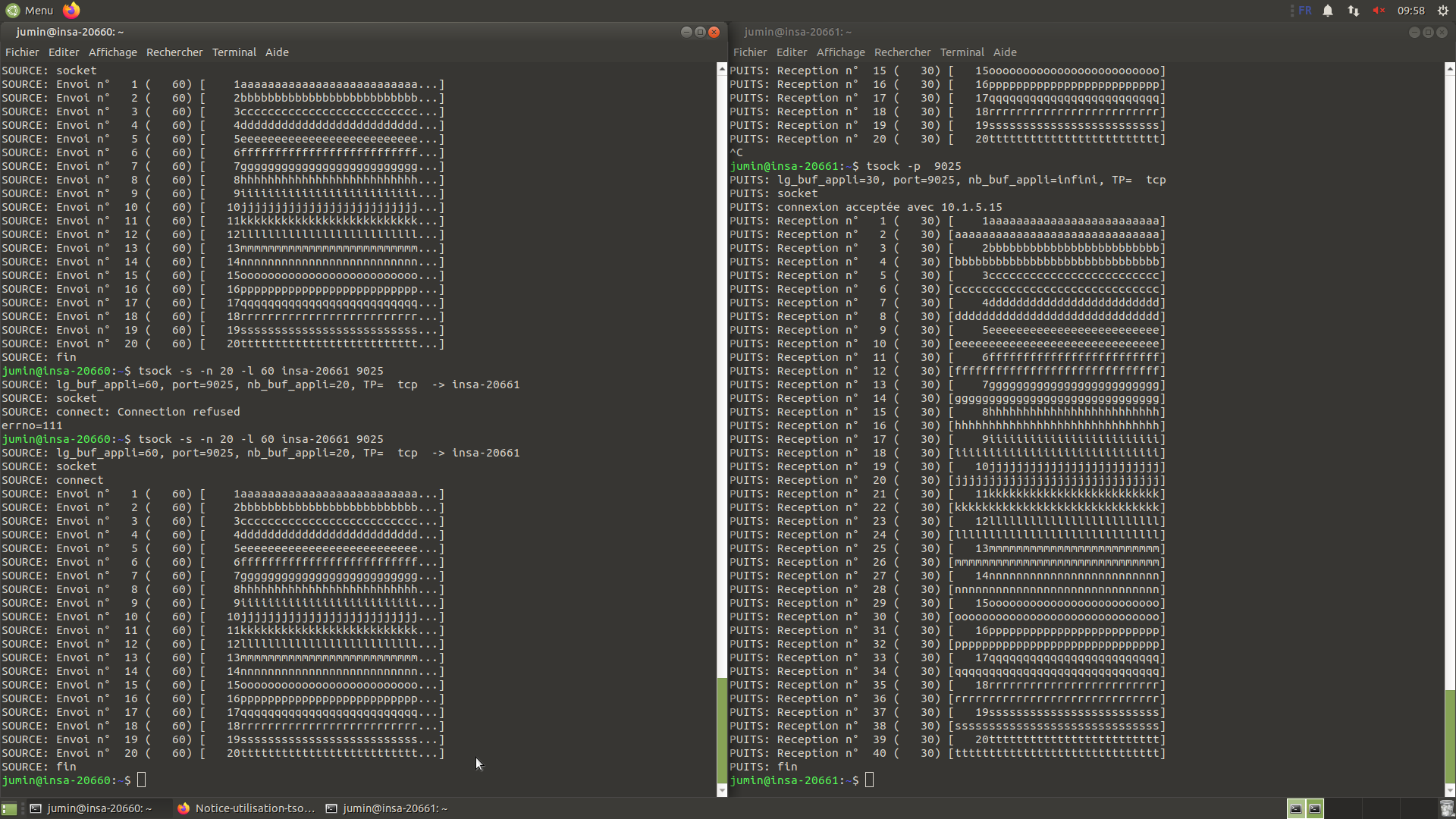
Figure : Exemple de configuration reseau sous Unix/Linux - TP pratique
PART C : ASPECTS TECHNIQUES
Exercices pratiques des examens
Exercice 1 : Creation d'arborescence avec permissions
Objectif : reproduire exactement une structure de fichiers avec les bonnes permissions.
# Creation de l'arborescence
mkdir -p /tmp/test/test1 /tmp/test/test2 /tmp/test/test3

# Creation des fichiers
touch /tmp/test/test1/f1
touch /tmp/test/test2/f2
touch /tmp/test/test3/f3

# Attribution des permissions aux repertoires
chmod 750 /tmp/test/test1    # rwxr-x---
chmod 754 /tmp/test/test2    # rwxr-xr--
chmod 1777 /tmp/test/test3   # rwxrwxrwt (avec sticky bit)

# Attribution des permissions aux fichiers
chmod 640 /tmp/test/test1/f1 # rw-r-----
chmod 444 /tmp/test/test2/f2 # r--r--r--
chmod 700 /tmp/test/test3/f3 # rwx------
Explications permissions speciales :
chmod 1777 : le 1 devant correspond au sticky bit.
- Permet a chacun de creer des fichiers dans le repertoire
- Mais seul le proprietaire peut supprimer ses propres fichiers
- Typique pour /tmp
Exercice 2 : Correction de script shell
Script avec erreurs :
#/bin/bash                          # ERREUR: manque !

for i in 1..100                     # ERREUR: syntaxe incorrecte
do
 echo $i
done

for i in ls *                       # ERREUR: manque $()
do
  echo $i
done

i = 3                               # ERREUR: espaces autour de =

if test $i == 3 then                # ERREUR: -eq au lieu de ==, then mal place
  echo yes
else
  echo no
end                                 # ERREUR: doit etre fi

echo "un entier stp"
read i
echo entier saisi : $REPLY          # ERREUR: doit etre $i

n=4
for i in `seq 1 $n`
do
  tab[i]="toto"
done
echo ${tab}                         # ERREUR: doit etre ${tab[*]}
Version corrigee :
#!/bin/bash

for i in $(seq 1 100)
do
 echo $i
done

for i in $(ls *)
# ou plus simple: for i in *
do
  echo $i
done

i=3

if [ $i -eq 3 ]
then
  echo yes
else
  echo no
fi

echo "un entier stp"
read i
echo entier saisi : $i

n=4
for i in $(seq 1 $n)
do
  tab[$i]="toto"
done
echo ${tab[*]}
Exercice 3 : Analyse de pipeline complexe
Script d'analyse des processus parents :
#!/bin/bash

# Pipeline complexe
ps -ef | awk '{print $3}' | sort | uniq -c | awk '{print $2,$1}' | grep -v PPID > /tmp/f

# Boucle de traitement
while read v
do
  a=$(echo $v | awk '{print $1}')   # PID
  b=$(echo $v | awk '{print $2}')   # Nombre d'enfants
  echo le processus $a a $b enfants
done < /tmp/f
Explication detaillee du pipeline :
ps -ef: affiche tous les processus avec PID, PPID, etc.awk '{print $3}': extrait la 3e colonne (PPID)sort: trie les PPID numeriquementuniq -c: compte les occurrences de chaque PPID uniqueawk '{print $2,$1}': inverse l'ordre (PPID puis compteur)grep -v PPID: exclut la ligne d'en-tete> /tmp/f: sauvegarde dans fichier temporaire
Resultat dans /tmp/f : chaque ligne contient un PID et le nombre de fois qu'il apparait comme parent (nombre d'enfants).
La boucle while :
Lit chaque ligne du fichier /tmp/f et extrait :
- Variable
a: le PID du processus - Variable
b: le nombre d'enfants de ce processus
Affiche : "le processus XXX a YYY enfants"
Exercice 4 : Permissions et securite
Analyse des permissions d'un jeu :
drwxr-xr-x 2 etudiant etudiants 4096 jeu/
-r-sr-xr-x 1 etudiant etudiants 133792 le_binaire_du_jeu
-rw------- 1 etudiant etudiants 39 le_fichier_des_scores
Analyse :
Le binaire (r-sr-xr-x) :
- Bit SUID active (s a la place de x pour user)
- Tous peuvent l'executer (r-x pour group et others)
- Le jeu s'execute avec les droits de
etudiant - Permet d'acceder au fichier des scores
Le fichier des scores (rw-------) :
- Accessible en lecture/ecriture uniquement par
etudiant - Autres utilisateurs ne peuvent ni lire ni ecrire
- Protection des scores contre la triche
Logique :
- Les joueurs executent le binaire avec SUID
- Le programme s'execute comme
etudiant - Il peut donc modifier le fichier des scores
- Mais les joueurs ne peuvent pas modifier directement les scores
- Empeche la triche tout en permettant le jeu
Commandes essentielles a maitriser
Navigation et fichiers :
pwd, cd, ls, mkdir, rmdir, touch, cp, mv, rm, cat, more, less, head, tailPermissions :
chmod, chown, chgrp, umaskProcessus :
ps, top, kill, killall, bg, fg, jobsRecherche :
find, locate, which, whereis, grepTraitement texte :
grep, sed, awk, sort, uniq, wc, cut, trSysteme :
uname, hostname, whoami, who, w, df, du, free, dateArchivage :
tar, gzip, gunzip, zip, unzipPART D : ANALYSE ET REFLEXION
Competences acquises
Ligne de commande :
- Maitrise des commandes essentielles Unix
- Navigation efficace dans le systeme de fichiers
- Gestion des fichiers et repertoires
- Utilisation de la documentation (man)
Scripting :
- Automatisation de taches repetitives
- Programmation shell avec bash
- Structures de controle (boucles, conditions)
- Manipulation de variables et tableaux
- Traitement de fichiers texte
Administration systeme :
- Gestion des permissions et securite
- Gestion des processus
- Surveillance du systeme
- Archivage et sauvegarde
Outils avances :
- Pipes et redirections pour combiner commandes
- Expressions regulieres pour recherche
- Traitement de flux avec awk et sed
- Analyse de logs et fichiers
Applications pratiques
Unix/Linux est omnipresent dans l'informatique moderne :
Developpement logiciel :
- Environnement de developpement
- Compilation et build
- Gestion de versions (Git)
- Tests automatises
Systemes embarques :
- Linux embarque sur Raspberry Pi, BeagleBone
- Systemes IoT
- Routeurs et equipements reseau
- Android (base sur Linux)
Serveurs et Cloud :
- Serveurs web (Apache, Nginx)
- Bases de donnees (MySQL, PostgreSQL)
- Services cloud (AWS, Azure, GCP)
- Conteneurs (Docker, Kubernetes)
Administration systeme :
- Gestion de serveurs
- Automatisation (scripts, cron)
- Monitoring et logs
- Sauvegardes
DevOps :
- Deploiement continu (CI/CD)
- Automatisation d'infrastructure
- Configuration management (Ansible, Puppet)
- Orchestration de conteneurs
Liens avec autres cours
| Cours | Lien |
|---|---|
| Langage C (S5) | Programmation systeme, appels systeme |
| Systemes d'exploitation (S5) | Concepts de processus, memoire |
| Reseau (S5) | Commandes reseau, sockets |
| Architecture Materielle (S5) | Gestion peripheriques, drivers |
| Temps Reel (S8) | Linux temps reel, ordonnancement |
| Cloud Computing (S9) | Serveurs Linux, administration |
Methodologie de travail
Apprentissage par la pratique :
La meilleure facon d'apprendre Unix est de pratiquer quotidiennement :
- Utiliser le terminal au lieu de l'interface graphique
- Ecrire des scripts pour automatiser ses taches
- Lire le man des commandes
- Experimenter dans une VM pour eviter les erreurs
Ressources utiles :
man commande: documentation integreecommande --help: aide rapide/usr/share/doc: documentation detaillee- StackOverflow et forums Linux
- Livres : "The Linux Command Line", "Unix and Linux System Administration Handbook"
Bonnes pratiques :
Scripts :
- Toujours inclure le shebang
- Commenter son code
- Gerer les erreurs
- Tester avant deploiement
Securite :
- Principe du moindre privilege
- Eviter d'executer en root
- Verifier les permissions
- Sauvegarder avant modifications importantes
Mon opinion
Ce cours est fondamental pour tout ingenieur informatique ou electronique.
Points forts :
- Competences immediatement applicables
- Universalite (Unix/Linux partout)
- Efficacite de la ligne de commande
- Automatisation puissante avec scripts
Importance professionnelle :
Unix/Linux est incontournable pour :
- Developpement sur systemes embarques
- Administration de serveurs
- DevOps et Cloud
- IoT et objets connectes
- Intelligence artificielle (environnements de calcul)
Productivite :
Maitriser la ligne de commande permet :
- Automatiser taches repetitives (gain de temps)
- Traiter volumes importants de donnees
- Travailler sur systemes distants (SSH)
- Scripter solutions sur mesure
- Diagnostiquer problemes efficacement
Complementarite avec autres competences :
Unix s'integre parfaitement avec :
- Programmation C/C++ (compilation, debugging)
- Developpement web (serveurs, deploiement)
- Data science (traitement de donnees)
- Cybersecurite (analyse de logs, forensics)
Perspectives d'evolution
Technologies emergentes :
Conteneurs : Docker et Kubernetes utilisent intensivement Unix.
Edge Computing : Linux sur dispositifs embarques.
Automatisation : Infrastructure as Code (Terraform, Ansible).
Cloud natif : Microservices sur Linux.
Conseils pratiques
Pour progresser :
- Utiliser Linux comme systeme principal (dual-boot ou VM)
- Personnaliser son environnement (bashrc, aliases)
- Contribuer a des projets open-source
- Installer un serveur personnel (web, NAS)
- Automatiser ses taches quotidiennes avec scripts
Erreurs a eviter :
- Ne jamais executer
rm -rf /meme par curiosite - Toujours verifier avant
rm -rf - Sauvegarder avant modifications systeme
- Tester scripts dans un environnement de test
- Lire la documentation avant utilisation
Bilan personnel : Ce cours a fourni les bases essentielles pour travailler efficacement en environnement Unix/Linux. La maitrise de la ligne de commande et des scripts shell est une competence transversale precieuse pour toute carriere en informatique ou electronique. Ces connaissances sont quotidiennement utiles, que ce soit pour le developpement, l'administration systeme, ou le deploiement d'applications. La philosophie Unix (outils simples et combinables) reste d'actualite et influence de nombreux systemes modernes.
Documents de Cours
Voici les supports de cours en PDF pour approfondir le systeme Unix :
Cours Unix Complet
Guide complet du systeme Unix, commandes shell, scripts Bash, gestion de processus et administration systeme.
Memo Commandes Unix
Aide-memoire pratique des commandes Unix/Linux les plus utilisees pour la ligne de commande et les scripts.
Unix Systems - S5
Year: 2022-2023 (Semester 5)
Credits: 3 ECTS
Type: Operating Systems
PART A: GENERAL OVERVIEW
Course Objectives
This course introduces Unix/Linux operating systems with a focus on practical use of the command line, shell programming, and basic system administration. The emphasis is on mastering essential tools for development and operation of embedded systems.
Target Skills
- Master the Unix/Linux command line
- Write shell scripts for automation
- Manage files, processes and permissions
- Use text processing tools (grep, sed, awk)
- Understand the file system architecture
- Perform basic system administration tasks
- Combine commands with pipes and redirections
- Solve practical problems with Unix tools
Organization
- Teaching hours: Lectures, tutorials and educational videos
- Assessment: Written exam + practical exercises
- Semester: 5 (2022-2023)
- Prerequisites: Basic computer science knowledge
PART B: EXPERIENCE, CONTEXT AND FUNCTION
Course Content
The course covers Unix fundamentals through a practical approach.
1. Unix Fundamentals
Unix Philosophy:
Design principles:
- Everything is a file (devices, sockets, processes)
- Simple programs that do one thing well
- Tool combination with pipes
- Text interfaces to facilitate automation
- Multi-user and multi-tasking system
System Architecture:
Figure: Layered architecture of a Unix/Linux system
| Component | Function |
|---|---|
| Kernel | Hardware management, processes, memory |
| Shell | Command interpreter |
| System programs | Basic utilities |
| Applications | User software |
Available shells:
- bash (Bourne Again Shell): most widespread
- sh (Bourne Shell): historical shell
- zsh (Z Shell): advanced shell with auto-completion
- csh/tcsh (C Shell): C-like syntax
2. File System
Standard directory tree:
Hierarchical structure starting from root (/).
| Directory | Contents |
|---|---|
| /bin | Essential commands (ls, cp, mv) |
| /etc | Configuration files |
| /home | User home directories |
| /usr | Applications and utilities |
| /var | Variable data (logs, caches) |
| /tmp | Temporary files |
| /dev | Device files |
| /proc | System and process information |
File types:
- Regular file (-): normal file
- Directory (d): folder
- Symbolic link (l): shortcut to another file
- Block device (b): hard drive, USB
- Character device (c): terminal, printer
- Socket (s): inter-process communication
- Named pipe (p): communication channel
Navigation commands:
pwd                    # Display current directory
cd /path/to/dir        # Change directory
cd ..                  # Go up one level
cd ~                   # Go to home
cd -                   # Return to previous directory
ls                     # List files
ls -l                  # Detailed listing
ls -a                  # Show hidden files
ls -lh                 # Human-readable sizes (KB, MB)
File manipulation:
# Creation
touch file.txt         # Create empty file
mkdir folder           # Create directory
mkdir -p a/b/c         # Create directory tree

# Copy and move
cp source dest         # Copy file
cp -r dir1 dir2        # Copy directory recursively
mv old new             # Rename/move

# Deletion
rm file                # Delete file
rm -r folder           # Delete directory recursively
rm -f file             # Force deletion
rmdir folder           # Delete empty directory
File viewing:
cat file               # Display full content
more file              # Display page by page
less file              # Navigate through file
head file              # Display first lines
head -n 20 file        # Display first 20 lines
tail file              # Display last lines
tail -f file           # Follow additions in real time (logs)
3. Permissions and Access Rights
Permission system:
Format: drwxrwxrwx
- First character: file type
- Next 3 characters: owner (user) rights
- Next 3: group rights
- Last 3: others rights
Permission types:
| Permission | File | Directory |
|---|---|---|
| r (read) | Read content | List content |
| w (write) | Modify file | Create/delete files |
| x (execute) | Execute file | Access directory |
Numeric representation:
Each permission has a value:
- r = 4
- w = 2
- x = 1
Examples:
- 755 = rwxr-xr-x (owner: all, others: read+execute)
- 644 = rw-r--r-- (owner: read+write, others: read only)
- 700 = rwx------ (owner only has all rights)
- 777 = rwxrwxrwx (all rights for everyone)
Management commands:
# Modify permissions
chmod 755 file                 # Numeric mode
chmod u+x file                 # Add execute for user
chmod g-w file                 # Remove write for group
chmod o+r file                 # Add read for others
chmod a+x file                 # Add execute for all

# Modify owner
chown user file                # Change owner
chown user:group file          # Change user and group
chgrp group file               # Change group only
Special permissions:
SUID (Set User ID): 4xxx or u+s
- The file executes with the owner's rights
- Example: /usr/bin/passwd (allows users to change their password)
SGID (Set Group ID): 2xxx or g+s
- The file executes with the group's rights
- On a directory: created files inherit the group
Sticky bit: 1xxx or +t
- On directory: only the owner can delete their files
- Example: /tmp (shared directory but protected files)
Exam example:
chmod 1777 /tmp/test3    # Sticky bit + all rights
chmod 750 /tmp/test1     # rwxr-x---
chmod 640 file           # rw-r-----
4. Process Management
Process concept:
A process is a running program.
Main attributes:
- PID (Process ID): unique identifier
- PPID (Parent Process ID): parent process
- UID: owner user
- State: running, sleeping, stopped, zombie
- Priority: nice value
Management commands:
# Display processes
ps                    # Current user's processes
ps aux                # All processes detailed
ps -ef                # Long format
top                   # Real-time monitoring
htop                  # Improved version of top

# Process control
kill PID              # Send TERM signal (graceful termination)
kill -9 PID           # KILL signal (forced termination)
killall name          # Kill by program name
pkill pattern         # Kill by pattern

# Background
command &             # Launch in background
jobs                  # List jobs
fg %1                 # Bring job 1 to foreground
bg %1                 # Continue job 1 in background
Ctrl+Z                # Suspend current process
Exam example analysis:
Command: ps -ef | awk '{print $3}' | sort | uniq -c | awk '{print $2,$1}' | grep -v PPID
Breakdown:
ps -ef: list all processesawk '{print $3}': extract PPID column (parent)sort: sort PPIDsuniq -c: count occurrences of each PPIDawk '{print $2,$1}': swap columns (PPID then count)grep -v PPID: exclude the header
Result: list of processes with their number of children.
5. Shell Programming (Bash)
Basic script structure:
#!/bin/bash
# Shebang: specifies the interpreter to use

# This is a comment

echo "First shell script"
Execution:
chmod +x script.sh     # Make executable
./script.sh # ExecuteVariables:
# Declaration (no spaces around =)
name="Cedric"
age=25
i=3

# Usage
echo "My name is $name"
echo "I am ${age} years old"

# Environment variables
echo $HOME             # Home directory
echo $PATH             # Command search paths
echo $USER             # Username
Reading input:
echo "Enter a number:"
read number
echo "You entered: $number"

# Read into specific variable
read -p "Name: " name
Conditional structures:
# if-then-else
if test $i -eq 3
then
  echo "i equals 3"
else
  echo "i does not equal 3"
fi

# Alternative form with brackets
if [ $i -eq 3 ]
then
  echo "i equals 3"
fi

# Numeric comparison operators
# -eq (equal), -ne (not equal), -lt (less than)
# -le (less or equal), -gt (greater than), -ge (greater or equal)

# String comparisons
if [ "$str1" = "$str2" ]
then
  echo "Strings are identical"
fi

# File tests
if [ -f file ]         # File exists
if [ -d folder ]       # Directory exists
if [ -r file ]         # File is readable
if [ -w file ]         # File is writable
if [ -x file ]         # File is executable

# Case
case $var in
  1) echo "One" ;;
  2) echo "Two" ;;
  *) echo "Other" ;;
esacLoops:
# For loop with sequence
for i in $(seq 1 100)
do
  echo $i
done

# For loop on files
for file in *.txt
do
  echo "Processing $file"
done

# For loop on command output
for file in $(ls *)
do
  echo $file
done

# While loop
counter=1
while [ $counter -le 10 ]
do
  echo $counter
  counter=$((counter + 1))
done

# While loop with file reading
while read line
do
  echo "Line: $line"
done < file.txt

# Until (opposite of while)
until [ $counter -gt 10 ]
do
  echo $counter
  counter=$((counter + 1))
doneArrays:
# Declaration
tab[0]="first"
tab[1]="second"

# Or
declare -a tab
tab=("one" "two" "three")

# Filling in a loop
n=4
for i in $(seq 1 $n)
do
  tab[$i]="element$i"
done

# Access
echo ${tab[0]}         # First element
echo ${tab[*]}         # All elements
echo ${#tab[*]} # Number of elementsFunctions:
# Definition
my_function() {
  echo "Hello $1"      # $1 = first argument
  return 0             # Return code
}

# Call
my_function "Cedric"
Common mistakes to avoid:
From the exam:
- Forgetting the
!in the shebang:#!/bin/bash - Spaces around
=: usei=3noti = 3 - Wrong loop syntax:
for i in $(seq 1 100)notfor i in 1..100 - Wrong test:
if [ $i -eq 3 ]notif test $i == 3 then - Close with
finotend - Use
$ito read the variable, not$REPLY - Array access:
${tab[*]}not${tab} - Command substitution:
$(command)or`command`
6. Text Processing
grep (pattern search):
grep "pattern" file              # Search for pattern
grep -i "pattern" file           # Case insensitive
grep -v "pattern" file           # Invert (lines without pattern)
grep -r "pattern" directory/     # Recursive in directory
grep -n "pattern" file           # Show line numbers
grep -c "pattern" file           # Count occurrences
grep -E "regex" file             # Extended regular expressions
sed (stream editor):
# Substitution
sed 's/old/new/' file                  # First occurrence per line
sed 's/old/new/g' file                 # All occurrences
sed -i 's/old/new/g' file             # Modify file in place

# Deletion
sed '/pattern/d' file                  # Delete lines containing pattern
sed '1d' file                          # Delete first line
sed '1,5d' file                        # Delete lines 1 to 5
awk (processing language):
# Display columns
awk '{print $1}' file                  # First column
awk '{print $1, $3}' file             # Columns 1 and 3
awk '{print $NF}' file                # Last column

# With conditions
awk '$3 > 100 {print $1}' file        # If column 3 > 100

# Exam example
ps -ef | awk '{print $3}'             # Extract PPID
echo "$line" | awk '{print $1}'       # Extract first field
Other tools:
sort file                    # Sort lines
sort -n file                 # Numeric sort
sort -r file                 # Reverse sort
uniq file                    # Remove consecutive duplicates
uniq -c file                 # Count occurrences
wc file                      # Count lines, words, characters
wc -l file                   # Count lines only
cut -d':' -f1 file           # Extract first field (delimiter :)
7. Redirections and Pipes
Standard streams:
- stdin (0): standard input (keyboard)
- stdout (1): standard output (screen)
- stderr (2): error output (screen)
Redirections:
# Output redirection
command > file               # Overwrite file
command >> file              # Append to file
command 2> errors.txt        # Redirect errors
command 2>&1                 # Errors to standard output
command &> file              # Output and errors to file

# Input redirection
command < file               # Read from file
while read line
do
  echo $line
done < file.txt

# Pipe (output of one command = input of next)
command1 | command2
ps aux | grep firefox
cat file | sort | uniq
Complex exam example:
ps -ef | awk '{print $3}' | sort | uniq -c | awk '{print $2,$1}' | grep -v PPID > /tmp/fProcessing chain with 5 pipes combining several tools.
8. Basic System Administration
System information:
uname -a                # Full system info
hostname                # Machine name
whoami                  # Current user
who                     # Connected users
w                       # Users and activity
uptime                  # Uptime and load
date                    # Date and time
Disk management:
df -h                   # Disk space (human-readable)
du -sh folder           # Directory size
du -sh *                # Size of all items
User management:
passwd                  # Change password
sudo command            # Execute with root rights
su                      # Become root
su - user               # Switch user
File search:
find /path -name "*.txt"             # By name
find /path -type f                   # Regular files
find /path -type d                   # Directories
find /path -mtime -7                 # Modified within 7 days
find /path -size +100M               # Size > 100 MB
locate file                          # Fast search (database)
which command                        # Locate executable
Archiving and compression:
# tar (tape archive)
tar -cvf archive.tar files/         # Create archive
tar -xvf archive.tar                # Extract archive
tar -tvf archive.tar                # List contents

# With compression
tar -czvf archive.tar.gz files/     # Create + gzip
tar -xzvf archive.tar.gz            # Extract gzip
tar -cjvf archive.tar.bz2 files/    # Create + bzip2

# zip/unzip
zip -r archive.zip folder/
unzip archive.zipLinks:
# Symbolic link (shortcut)
ln -s /path/target link              # Create symbolic link

# Hard link (same inode)
ln original_file hard_link           # Create hard link
Figure: Example of network configuration under Unix/Linux - Practical lab
PART C: TECHNICAL ASPECTS
Practical Exam Exercises
Exercise 1: Creating a directory tree with permissions
Objective: reproduce a file structure exactly with the correct permissions.
# Create the directory tree
mkdir -p /tmp/test/test1 /tmp/test/test2 /tmp/test/test3

# Create files
touch /tmp/test/test1/f1
touch /tmp/test/test2/f2
touch /tmp/test/test3/f3

# Set directory permissions
chmod 750 /tmp/test/test1    # rwxr-x---
chmod 754 /tmp/test/test2    # rwxr-xr--
chmod 1777 /tmp/test/test3   # rwxrwxrwt (with sticky bit)

# Set file permissions
chmod 640 /tmp/test/test1/f1 # rw-r-----
chmod 444 /tmp/test/test2/f2 # r--r--r--
chmod 700 /tmp/test/test3/f3 # rwx------
Special permissions explanation:
chmod 1777: the leading 1 corresponds to the sticky bit.
- Allows everyone to create files in the directory
- But only the owner can delete their own files
- Typical for /tmp
Exercise 2: Shell script correction
Script with errors:
#/bin/bash                          # ERROR: missing !

for i in 1..100                     # ERROR: incorrect syntax
do
 echo $i
done

for i in ls *                       # ERROR: missing $()
do
  echo $i
done

i = 3                               # ERROR: spaces around =

if test $i == 3 then                # ERROR: -eq instead of ==, then misplaced
  echo yes
else
  echo no
end                                 # ERROR: should be fi

echo "an integer please"
read i
echo integer entered: $REPLY        # ERROR: should be $i

n=4
for i in `seq 1 $n`
do
  tab[i]="toto"
done
echo ${tab}                         # ERROR: should be ${tab[*]}
Corrected version:
#!/bin/bash

for i in $(seq 1 100)
do
 echo $i
done

for i in $(ls *)
# or simpler: for i in *
do
  echo $i
done

i=3

if [ $i -eq 3 ]
then
  echo yes
else
  echo no
fi

echo "an integer please"
read i
echo integer entered: $i

n=4
for i in $(seq 1 $n)
do
  tab[$i]="toto"
done
echo ${tab[*]}
Exercise 3: Complex pipeline analysis
Parent process analysis script:
#!/bin/bash

# Complex pipeline
ps -ef | awk '{print $3}' | sort | uniq -c | awk '{print $2,$1}' | grep -v PPID > /tmp/f

# Processing loop
while read v
do
  a=$(echo $v | awk '{print $1}')   # PID
  b=$(echo $v | awk '{print $2}')   # Number of children
  echo process $a has $b children
done < /tmp/f
Detailed pipeline explanation:
ps -ef: displays all processes with PID, PPID, etc.awk '{print $3}': extracts the 3rd column (PPID)sort: sorts PPIDs numericallyuniq -c: counts occurrences of each unique PPIDawk '{print $2,$1}': reverses order (PPID then counter)grep -v PPID: excludes the header line> /tmp/f: saves to a temporary file
Result in /tmp/f: each line contains a PID and the number of times it appears as a parent (number of children).
The while loop:
Reads each line from /tmp/f and extracts:
- Variable
a: the process PID - Variable
b: the number of children of this process
Outputs: "process XXX has YYY children"
Exercise 4: Permissions and security
Analysis of a game's permissions:
drwxr-xr-x 2 student students 4096 game/
-r-sr-xr-x 1 student students 133792 the_game_binary
-rw------- 1 student students 39 the_scores_fileAnalysis:
The binary (r-sr-xr-x):
- SUID bit enabled (s instead of x for user)
- Everyone can execute it (r-x for group and others)
- The game runs with
student's rights - Allows access to the scores file
The scores file (rw-------):
- Readable/writable only by
student - Other users cannot read or write
- Protection of scores against cheating
Logic:
- Players execute the binary with SUID
- The program runs as
student - It can therefore modify the scores file
- But players cannot modify scores directly
- Prevents cheating while allowing the game to be played
Essential Commands to Master
Navigation and files:
pwd, cd, ls, mkdir, rmdir, touch, cp, mv, rm, cat, more, less, head, tailPermissions:
chmod, chown, chgrp, umaskProcesses:
ps, top, kill, killall, bg, fg, jobsSearch:
find, locate, which, whereis, grepText processing:
grep, sed, awk, sort, uniq, wc, cut, trSystem:
uname, hostname, whoami, who, w, df, du, free, dateArchiving:
tar, gzip, gunzip, zip, unzipPART D: ANALYSIS AND REFLECTION
Skills Acquired
Command line:
- Mastery of essential Unix commands
- Efficient navigation in the file system
- File and directory management
- Using documentation (man)
Scripting:
- Automation of repetitive tasks
- Shell programming with bash
- Control structures (loops, conditions)
- Variable and array manipulation
- Text file processing
System administration:
- Permission management and security
- Process management
- System monitoring
- Archiving and backup
Advanced tools:
- Pipes and redirections to combine commands
- Regular expressions for searching
- Stream processing with awk and sed
- Log and file analysis
Practical Applications
Unix/Linux is ubiquitous in modern computing:
Software development:
- Development environment
- Compilation and build
- Version control (Git)
- Automated testing
Embedded systems:
- Embedded Linux on Raspberry Pi, BeagleBone
- IoT systems
- Routers and network equipment
- Android (based on Linux)
Servers and Cloud:
- Web servers (Apache, Nginx)
- Databases (MySQL, PostgreSQL)
- Cloud services (AWS, Azure, GCP)
- Containers (Docker, Kubernetes)
System administration:
- Server management
- Automation (scripts, cron)
- Monitoring and logs
- Backups
DevOps:
- Continuous deployment (CI/CD)
- Infrastructure automation
- Configuration management (Ansible, Puppet)
- Container orchestration
Links with Other Courses
| Course | Connection |
|---|---|
| C Language (S5) | System programming, system calls |
| Operating Systems (S5) | Process concepts, memory |
| Networking (S5) | Network commands, sockets |
| Hardware Architecture (S5) | Device management, drivers |
| Real-Time Systems (S8) | Real-time Linux, scheduling |
| Cloud Computing (S9) | Linux servers, administration |
Working Methodology
Learning by practice:
The best way to learn Unix is to practice daily:
- Use the terminal instead of the graphical interface
- Write scripts to automate your tasks
- Read the man pages of commands
- Experiment in a VM to avoid mistakes
Useful resources:
man command: built-in documentationcommand --help: quick help/usr/share/doc: detailed documentation- StackOverflow and Linux forums
- Books: "The Linux Command Line", "Unix and Linux System Administration Handbook"
Best practices:
Scripts:
- Always include the shebang
- Comment your code
- Handle errors
- Test before deployment
Security:
- Principle of least privilege
- Avoid running as root
- Check permissions
- Back up before major changes
My Opinion
This course is fundamental for any computer science or electronics engineer.
Strengths:
- Immediately applicable skills
- Universality (Unix/Linux everywhere)
- Command line efficiency
- Powerful automation with scripts
Professional importance:
Unix/Linux is essential for:
- Embedded systems development
- Server administration
- DevOps and Cloud
- IoT and connected objects
- Artificial intelligence (computing environments)
Productivity:
Mastering the command line allows you to:
- Automate repetitive tasks (time savings)
- Process large volumes of data
- Work on remote systems (SSH)
- Script custom solutions
- Diagnose problems efficiently
Complementarity with other skills:
Unix integrates perfectly with:
- C/C++ programming (compilation, debugging)
- Web development (servers, deployment)
- Data science (data processing)
- Cybersecurity (log analysis, forensics)
Future Perspectives
Emerging technologies:
Containers: Docker and Kubernetes make intensive use of Unix.
Edge Computing: Linux on embedded devices.
Automation: Infrastructure as Code (Terraform, Ansible).
Cloud native: Microservices on Linux.
Practical Tips
To improve:
- Use Linux as your main system (dual-boot or VM)
- Customize your environment (bashrc, aliases)
- Contribute to open-source projects
- Set up a personal server (web, NAS)
- Automate your daily tasks with scripts
Mistakes to avoid:
- Never run
rm -rf /even out of curiosity - Always verify before
rm -rf - Back up before system changes
- Test scripts in a test environment
- Read the documentation before use
Personal assessment: This course provided the essential foundations for working effectively in a Unix/Linux environment. Mastery of the command line and shell scripts is a valuable cross-cutting skill for any career in computer science or electronics. This knowledge is useful daily, whether for development, system administration, or application deployment. The Unix philosophy (simple and combinable tools) remains relevant and influences many modern systems.
Course Documents
Here are the course materials in PDF to deepen your understanding of Unix systems:
Complete Unix Course
Comprehensive guide to Unix systems, shell commands, Bash scripts, process management and system administration.
Unix Command Cheat Sheet
Practical cheat sheet of the most commonly used Unix/Linux commands for the command line and scripts.
Redige par Cedric ChanfreauWritten by Cedric Chanfreau