Introduction
Dans le cadre de notre projet de developpement temps reel, nous avons ete charges de concevoir et d'implementer differentes fonctionnalites pour un robot. L'objectif principal etait de gerer efficacement et de maniere securisee les differentes taches du robot en utilisant des outils de synchronisation tels que les mutex et les semaphores. Ce rapport fournit un apercu du projet, des defis rencontres et des solutions implementees.
Introduction
In the context of our real-time development project, we were tasked with designing and implementing various functionalities for a robot. The primary objective was to manage the robot's different tasks efficiently and securely using synchronization tools such as mutexes and semaphores. This report provides an overview of the project, the challenges encountered, and the solutions implemented.
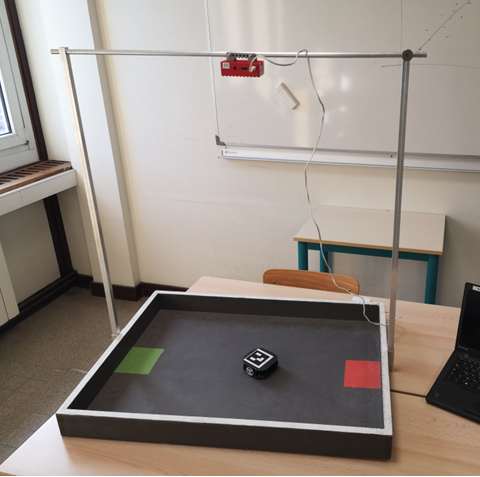
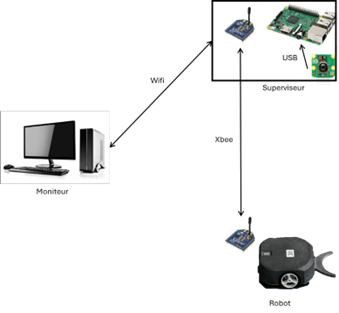
Projet
Le projet impliquait le developpement de plusieurs fonctionnalites pour un robot, notamment la gestion de la camera, la detection de l'arene et la synchronisation des taches. Nous avons utilise FreeRTOS pour gerer les taches en temps reel et assurer une execution concurrente securisee.
Fonctionnalites du projet
Project
The project involved developing several functionalities for a robot, including camera management, arena detection, and task synchronization. We used FreeRTOS to manage real-time tasks and ensure safe concurrent execution.
Project Functionalities
| Function Name | Behavior Description | Inputs | Outputs |
|---|---|---|---|
| Start server | Launch server. If it fails, display a message and stop the program, otherwise produce “server started”. | Event: Start Data: inputStream |
Event: Server started |
| Connect to monitor | Wait for “server started”, call AcceptClient and wait for “open socket”. If ok, produce “connection established”. | Event: Server started | Event: connection established |
| Process monitor message | Wait for “connection established”. While: Wait for message inputStream (Read). If message = open com robot -> open comRobot. If message = open camera -> open camera. If message = close camera -> close camera. | Event: connection established Data: Movement |
Event: Open comRobot Open camera Close camera Start robot start arena search start robot search |
| Establish connection | Wait for “server started”, call AcceptClient and wait for “open socket”. If yes, connection established. | Event: openSocket serverStarted |
Event: connectionMonitor |
| Set up communication | Wait for “open comRobot”. Set up communication with the robot. If communication is ok, post “messageToMonACK”, otherwise post “messageToMonNAC”. Update the robot com status. | Event: open comRobot Data: robot com status Message Post |
|
| Start Robot | Wait for “Start robot”. If “robot com status” is active, send start order and update “robot started”. | Event: open comRobot Data: robot com status |
Data: robot started |
| Move robot | Every 100ms, if “robot started” is true, read “movement” and send order, otherwise nothing. | Data: robot started | Order |
| Send message to monitor | Wait for “connection established”. While: Wait for messageToMon, send the message to the supervisor. End while. | Event: connection established Data: Outputstream |
|
| Read battery level | Every 500ms, if “robot started” is true, ask for battery level from the robot and post it for the monitor. Otherwise, nothing. | Data: robot started Data: Message Post |
|
| Open/close camera | Wait for “open camera” or “close camera”. Open or close the camera, send a message to the monitor, update “camera open”. | Open camera Close camera Event: Display image Data: “Camera open” |
|
| Display Image | Wait for “Display image”. Every 50ms, if “camera open” is true, take an image from the camera stream. If “display arena” = true then draw arena on the image. Post the image for the monitor. | Event: Display image Data: “Camera open” Data: Message Post |
|
| Search Arena | Wait for “start arena search”. If “camera open” is true: “camera open = false”. Take an image from the camera stream, analyze the image and draw the arena on it. Post it for the monitor. | Event: start arena search Data: Message Post display arena |
|
| Search Position | Wait for “start robot search”. If “camera open” is true: Take an image from the camera stream, analyze the image and draw the robot. Update “robot drawing”. | Event: start robot search Data: “camera open” Data: Robot drawing |
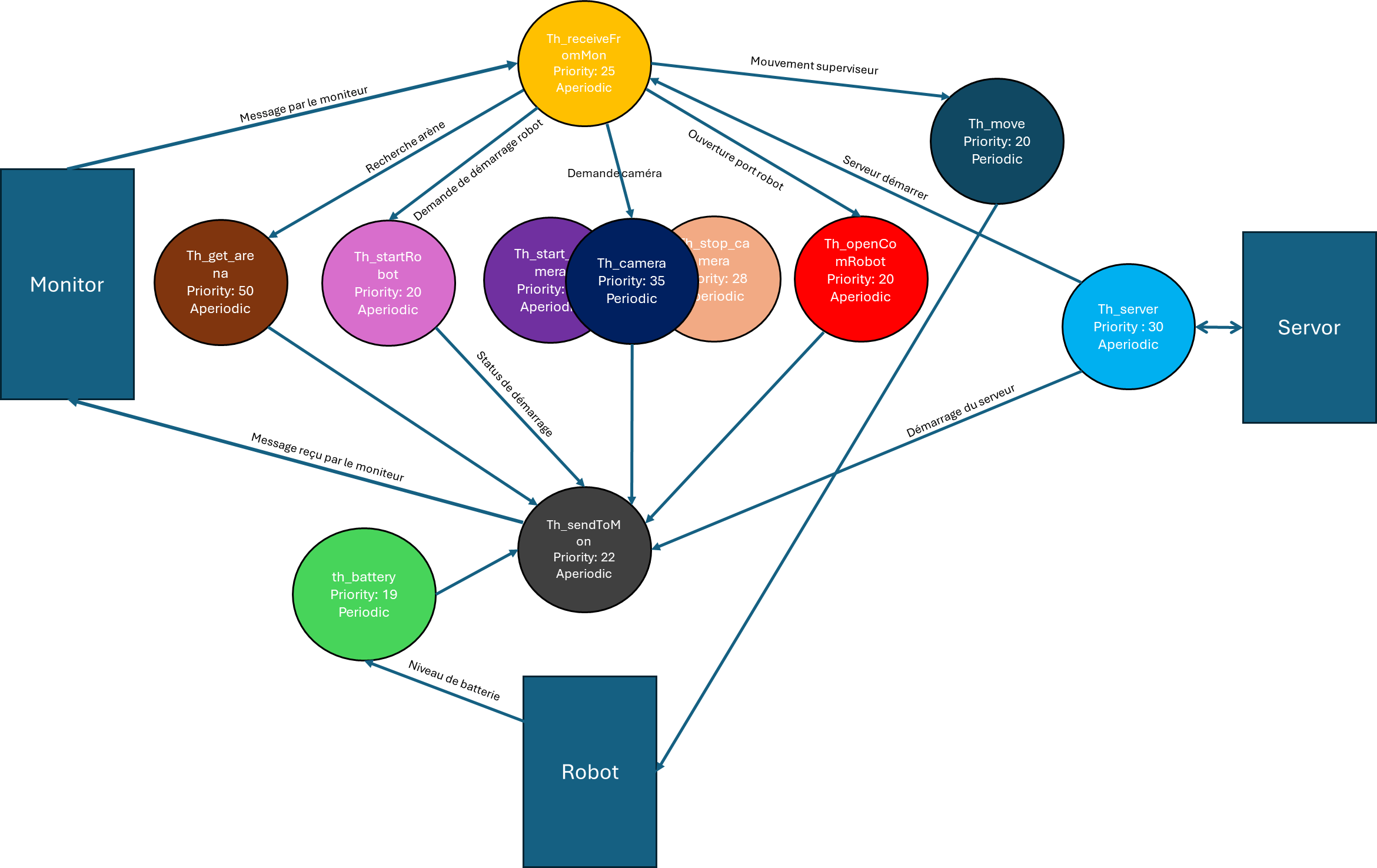
Fonctionnalites existantes
Avant de presenter les nouvelles fonctionnalites que nous avons implementees, il est important de noter que plusieurs fonctionnalites cles etaient deja etablies :
Fonctionnalite serveur
La fonctionnalite serveur est responsable de la gestion de la communication entre le robot et les systemes externes. Cela inclut la reception de commandes et l'envoi de mises a jour d'etat.
Connexion au moniteur
La connexion avec le moniteur est etablie, permettant au robot d'envoyer des donnees en temps reel et de recevoir des instructions du systeme de surveillance.
Mouvement du robot
La fonctionnalite de deplacement du robot est deja en place, permettant au robot de naviguer dans son environnement en fonction des commandes recues.
Lecture du niveau de batterie
La lecture du niveau de batterie consiste a surveiller l'etat de la batterie du robot pour s'assurer qu'il dispose d'une puissance suffisante pour effectuer ses taches. Cela garantit que le robot peut alerter le systeme si le niveau de batterie est faible. En suivant le niveau de batterie, nous pouvons prevenir les arrets inattendus et assurer un fonctionnement efficace du robot.
Existing Functionalities
Before diving into the new functionalities we implemented, it is important to note that several key functionalities were already established:
Server Functionality
The server functionality is responsible for handling communication between the robot and external systems. This includes receiving commands and sending status updates.
Monitor Connection
The connection with the monitor is established, enabling the robot to send real-time data and receive instructions from the monitoring system.
Robot Movement
The functionality to move the robot is already in place, allowing the robot to navigate its environment based on the commands received.
Battery Level Reading
Battery level reading involves monitoring the robot's battery status to ensure it has sufficient power to perform its tasks. This ensures that the robot has sufficient power to perform its tasks and can alert the system if the battery level is low. By keeping track of the battery level, we can prevent unexpected shutdowns and ensure the robot operates efficiently.
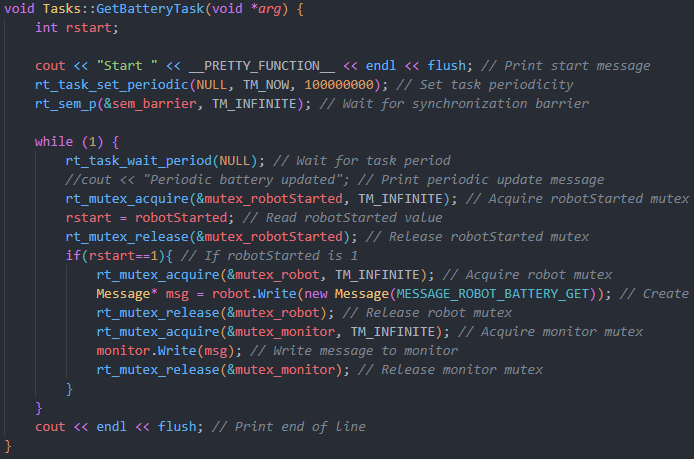
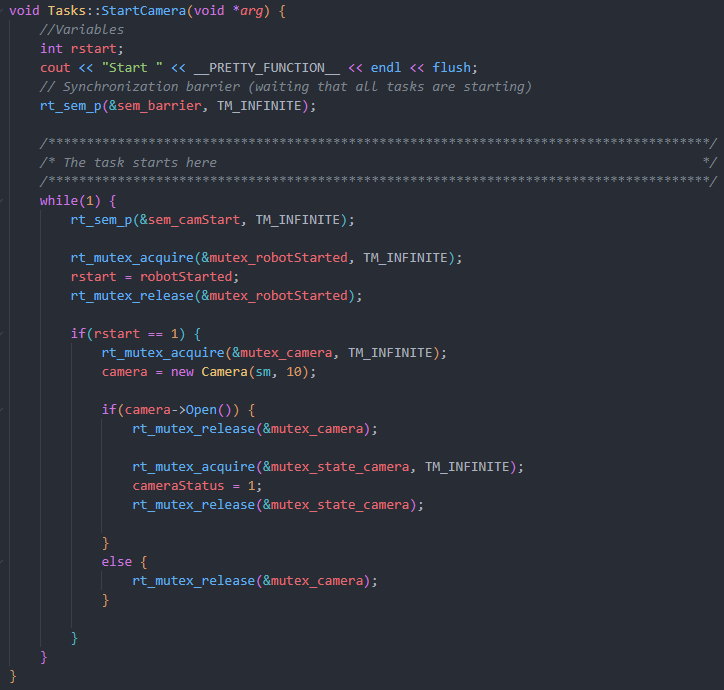
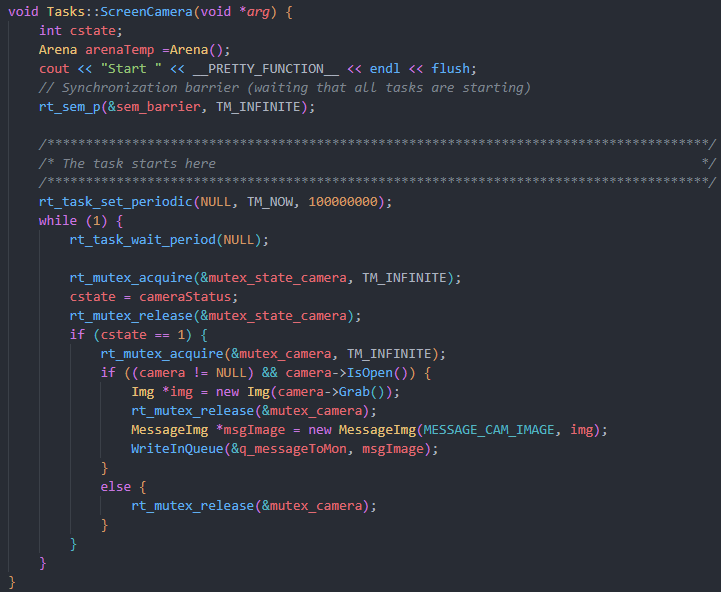
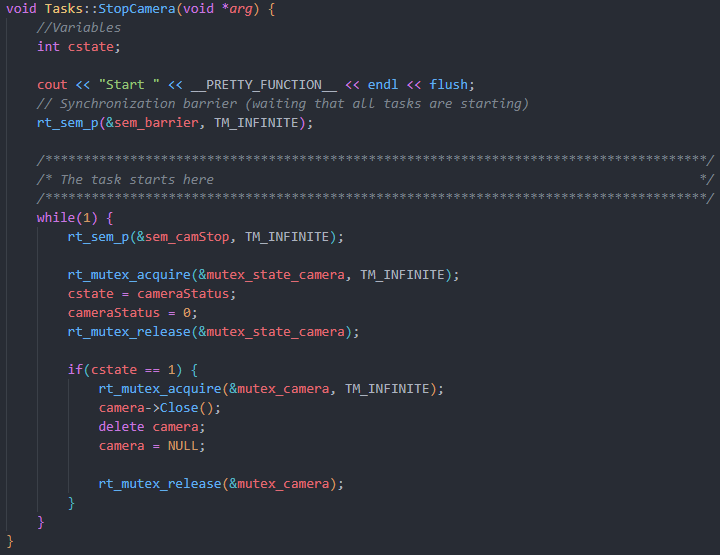
Gestion de la camera
La gestion de la camera impliquait plusieurs operations, telles que l'ouverture, la fermeture et la capture d'images. Nous avons utilise des mutex pour proteger l'acces aux ressources partagees, telles que l'etat de la camera et l'objet camera lui-meme. Voici un extrait de code illustrant l'utilisation des mutex.
Camera Management
Camera management involved several operations, such as opening, closing, and capturing images. We used mutexes to protect access to shared resources, such as the camera state and the camera object itself. Here is a code snippet illustrating the use of mutexes.
Detection de l'arene
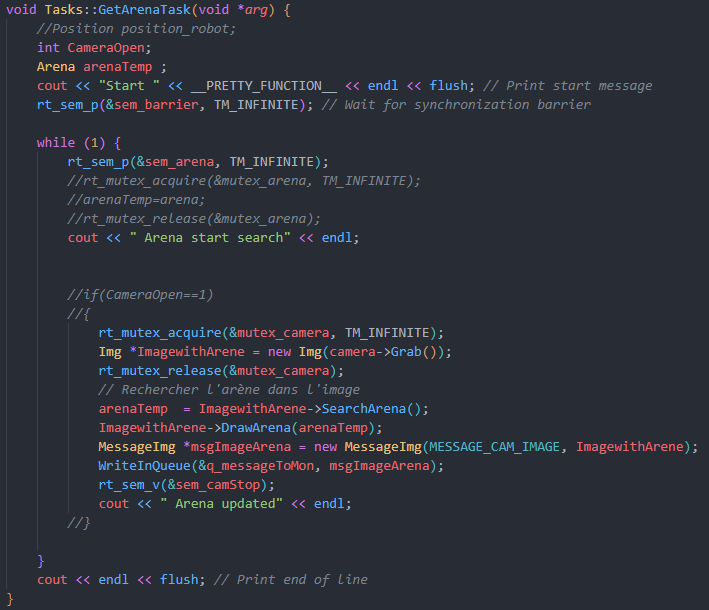
Pour la detection de l'arene, nous avons cree une fonction qui est appelee lorsque l'utilisateur appuie sur un bouton specifique. Cette fonction utilise des semaphores pour synchroniser l'execution et s'assurer que les taches sont executees dans le bon ordre.
Arena Detection
For arena detection, we created a function that is called when the user presses a specific button. This function uses semaphores to synchronize execution and ensure that tasks are executed in the correct order.
Conclusion
Ce projet nous a permis d'appliquer des concepts avances de programmation temps reel, tels que l'utilisation de mutex et de semaphores pour la synchronisation des taches. Nous avons implementé avec succes les fonctionnalites requises pour le robot tout en assurant une execution concurrente securisee. Les defis rencontres nous ont permis de mieux comprendre l'importance de la synchronisation et de la gestion des ressources dans la programmation multithreadee.
Conclusion
This project allowed us to apply advanced real-time programming concepts, such as using mutexes and semaphores for task synchronization. We successfully implemented the required functionalities for the robot while ensuring safe concurrent execution. The challenges we encountered helped us better understand the importance of synchronization and resource management in multithreaded programming.